📖 10. How to delete a registration?
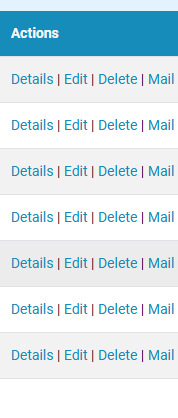
If a registration has not paid anything, you can simply delete it through one of the action buttons next to the registration on the roster page. E.g.
If the registration paid entry fee, you need to refund it first and then edit it's paid amount to be 0 and then delete it.
Click Details of the registration you will see a PayPal transaction ID -

Click it and it will open a link to the PayPal transaction. Complete the refund on PayPal and come back to the registration details page and click the Edit button.

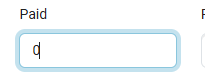
Update the Paid amount to 0 -
And click Save
Now you can click the Delete button

and the deletion will go through and the registration will disappear from the roster.
If a registration has not paid anything, you can simply delete it through one of the action buttons next to the registration on the roster page. E.g.
If the registration paid entry fee, you need to refund it first and then edit it's paid amount to be 0 and then delete it.
Click Details of the registration you will see a PayPal transaction ID -
Click it and it will open a link to the PayPal transaction. Complete the refund on PayPal and come back to the registration details page and click the Edit button.
Update the Paid amount to 0 -
And click Save
Now you can click the Delete button
and the deletion will go through and the registration will disappear from the roster.