📖 09. I have multiple chess players in the same family. What do I do
Each player needs their own NA Chess Hub account. Family accounts are not supported.
For instructions, see 01. How to create an account for player? on how to create player account.
Family members can use the same email address and phone number across their accounts. Email addresses do not need to be unique because they are not usernames and cannot be used to log in.
Although you must register each player separately, account switching makes the process easier—there’s no need to repeatedly log out and log back in.
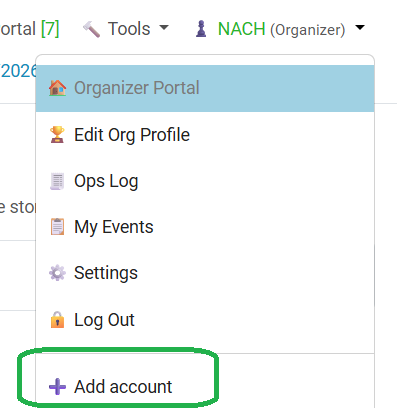
After signing in, open your username menu and select “Add account” to sign in to another family member’s account. You can then switch between your saved accounts to register each player for the same event or different events. Only one account is active at a time.
Account switching also works between organizer and player accounts—perfect for organizers who want to take a break from organizing and play some chess! :)
Each player needs their own NA Chess Hub account. Family accounts are not supported.
For instructions, see 01. How to create an account for player? on how to create player account.
Family members can use the same email address and phone number across their accounts. Email addresses do not need to be unique because they are not usernames and cannot be used to log in.
Although you must register each player separately, account switching makes the process easier—there’s no need to repeatedly log out and log back in.
After signing in, open your username menu and select “Add account” to sign in to another family member’s account. You can then switch between your saved accounts to register each player for the same event or different events. Only one account is active at a time.
Account switching also works between organizer and player accounts—perfect for organizers who want to take a break from organizing and play some chess! :)